Showing posts with label Google Images. Show all posts

If you are using FeedBurner to syndicate the RSS feeds of your blog, you can now easily track all the incoming traffic from feed clicks through Google Analytics.

Just open your FeedBurner dashboard, click the title of your RSS feed and choose "Configure Stats" under the Analyze Tab. Tick the options that say "Item views", "Item click" and "Track clicks as a traffic source in Google Analytics" and save.

track feed clicks

In addition to click counts, you’ll also know the exact source from where that click may originated.
This is useful data because, for instance, it will help you understand if people who subscribe to your feed inside Google Reader are more engaged than your "My Yahoo!" subscribers (or vice-versa).

Traffic from clicks inside your RSS feed will be included under "All Traffic Sources" and "Campaigns." in your Google Analytics reports. Select "Ad Content" from the segment drop down in the traffic source data table and it will show you the incoming traffic from your RSS feed segmented by specific feed readers or email clients.

rss feed analytics

Read More

google kids logoPuru Pratap Singh, a class IV student from Gurgaon in India, has won the Doodle 4 Google contest and you can see his artwork live on the Google India homepage.
The theme of this year’s Google Doodle contest was "My India".

Dennis Hwang, who is the creative genius behind every holiday logo that you see on the Google homepage across countries, was also in Delhi for the award function.

Puru, who is just nine years old, gets a laptop computer for winning the Doodle 4 Google Competition and his school (Amity) will receive a technology grant of around $2000 from Google India.

Some 4,000 logos were submitted by school students from across India for the contest and, though you won’t see any of them on the Google homepage, some of them very extremely creative. Here are my favorite picks:


incredible india

indian culture

indian soil

magical india

And here’s a time-lapse video that shows how Dennis Hwang draws a Google Doodle from start to finish.

Read More

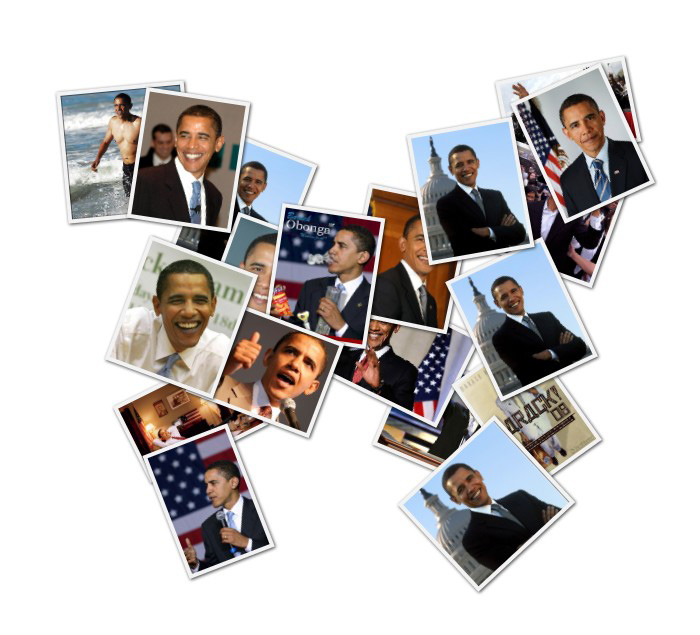
What you see on the right is a butterfly-shaped photo collage made with photographs of Obama (see large version) and it took me less than 15 seconds to create one. Wondering how?

obama - google images obama

That was simple. I did a simple search for "obama" on Google Images and then copied the search URL into shapecollage.com. Within seconds, the tool pulled all the photographs of Obama found on Google Images and turned them into a nice photo collage.

This collage is interactive because if you click any of the thumbnails in this pile of photographs, it will open the full resolution picture on original website so you don’t miss the context. Internally, Shape Collage uses an HTML image map to maintain this image-to-source mapping.

And here’s another photo collage created using book covers of New York Times Bestsellers as found on Amazon.com. Click on any cover to view the corresponding product page.

amazon best sellers

You can also create collages by merging photos from multiple sites into one – like a single collage for your Flickr and Picasa albums.

The Shape Collage Online web application is a complement to the Shape Collage desktop software, which includes additional features including the ability to generate high resolution collages.

Read More
on Saturday, December 12, 2009